Esporta
-
The Reimbursements section of the Staff module is dedicated to comprehensive management of expense reimbursements for business travel and work trips. The system allows for structured and transparent recording, tracking, and approval of reimbursement requests.
Key features:
- Complete travel mission registration with detailed information
- Expense forecast and budget management
- Integrated approval workflow
- Document attachments for expense receipts
- Status tracking for each request
Main Interface
Available Views
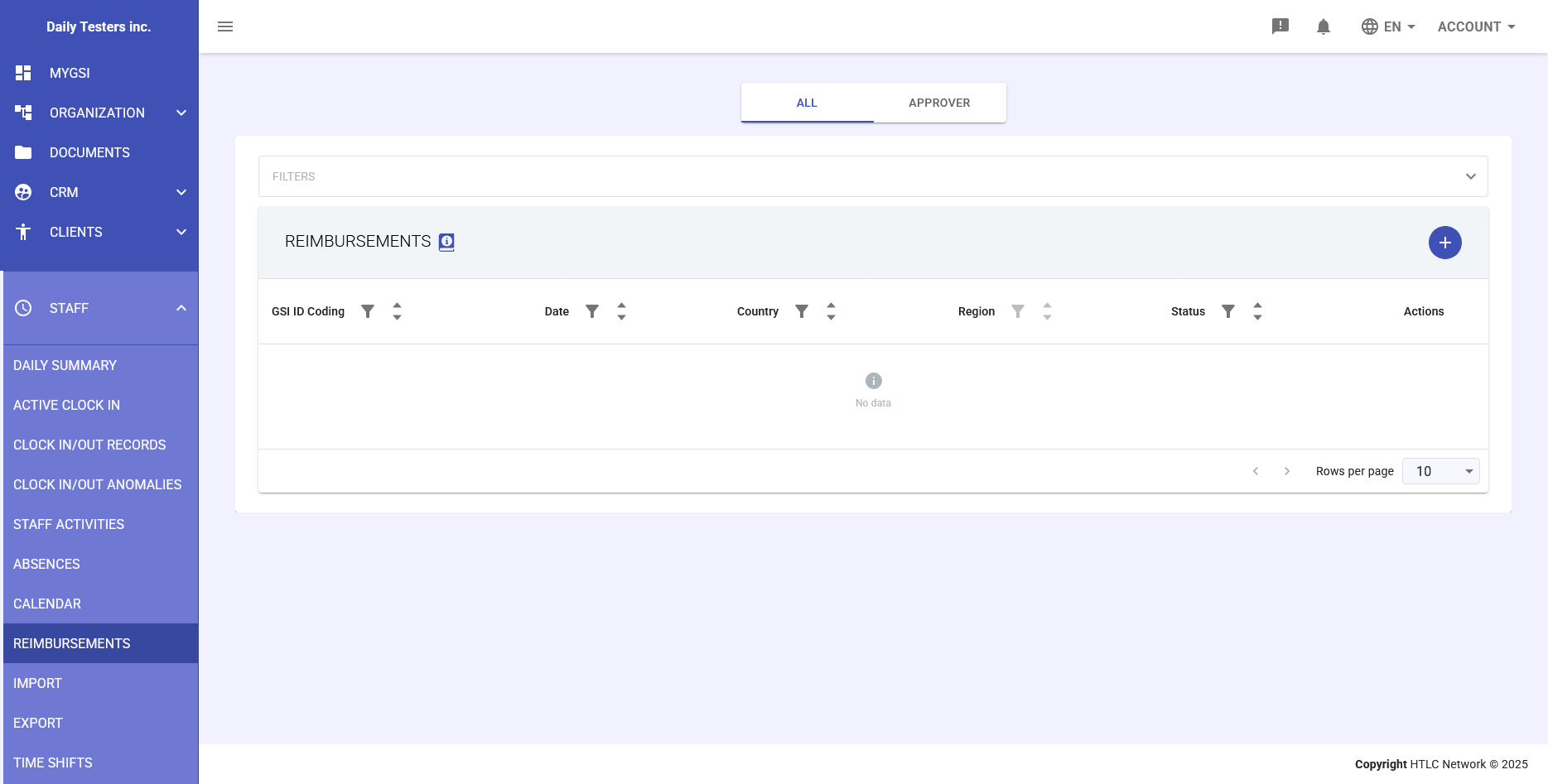
The main screen offers two viewing modes through tabs:
- ALL: Shows all reimbursement requests entered in the system
- APPROVER: Displays only requests requiring approval from the current user
Reimbursements Table
The main table presents the following columns:
- GSI ID Coding: Unique identifier for the reimbursement request
- Date: Period of the business trip
- Country: Destination country
- Region: Specific region or geographical area
- Status: Current status of the request (Pending, Approved, Rejected)
- Actions: Available options to manage the request
Filters
The system offers advanced filters to facilitate searching and managing requests:
- Filter by GSI code
- Filter by date or period
- Filter by country and region
- Filter by approval status
-
Adding a New Travel Mission
Entry Procedure
- Click the + (Add) button in the top right corner of the table
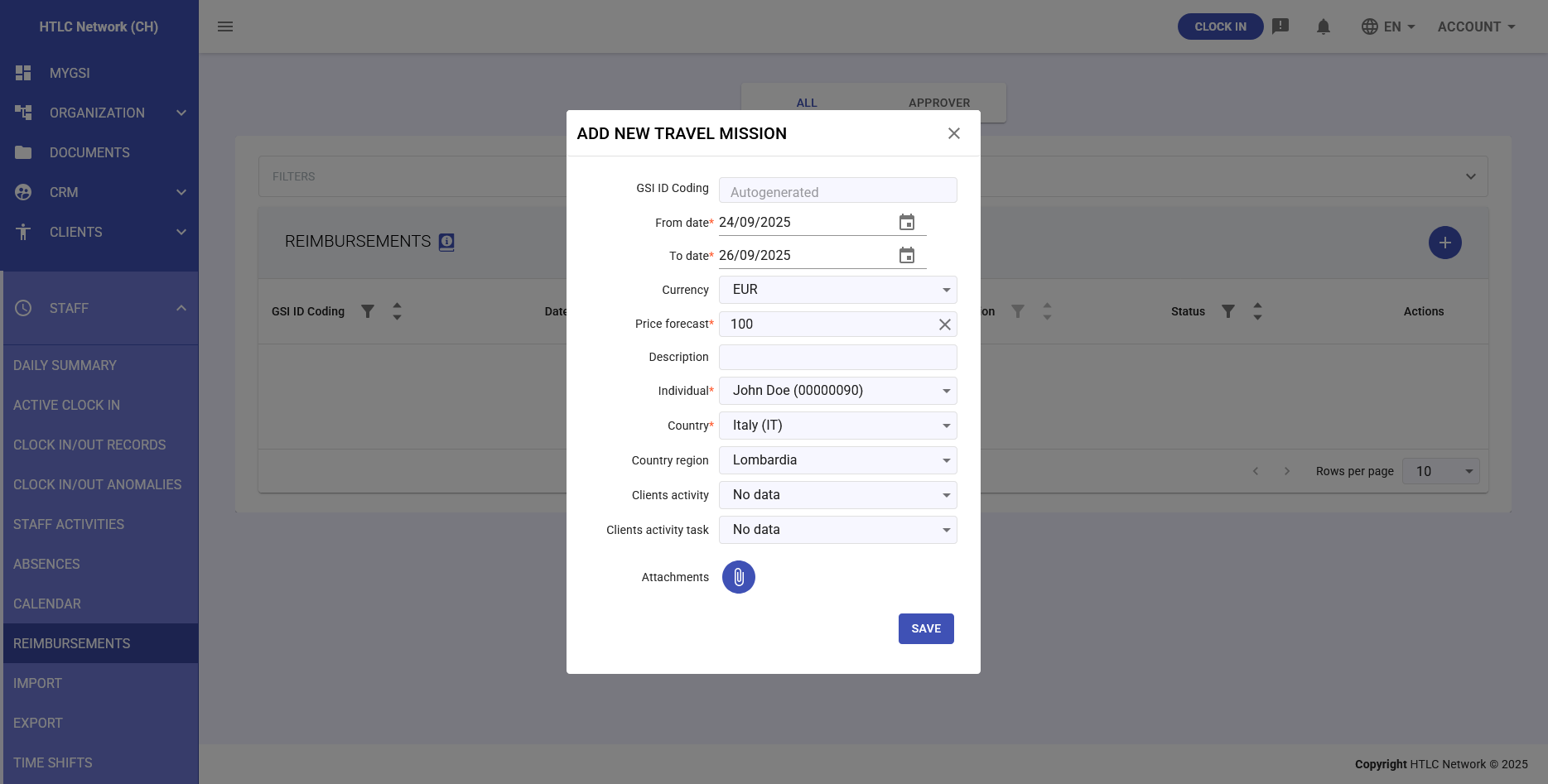
- The "ADD NEW TRAVEL MISSION" modal window will open
- Fill in all required form fields
- Attach any supporting documents
- Click SAVE to submit the request
Form Fields
Basic Information
- GSI ID Coding: Automatically generated by the system
- From date: Start date of the trip (required field)
- To date: End date of the trip (required field)
- Currency: Reference currency for expenses (EUR, USD, GBP, etc.)
Financial Details
- Price forecast: Advance estimate of total trip costs
- Description: Detailed description of the mission and expected expenses
Employee Information
- Individual: Selection of the employee taking the trip
- Dropdown menu with complete staff list
- Format: First Name Last Name (ID Code)
Location
- Country: Destination country
- Select country from the list
- "No data" option if not applicable
- Country region: Specific region or province
- Dynamically populated based on selected country
- "No data" option if not specified
Client Activity (Optional)
- Clients activity: Client or project associated with the trip
- Selectable from active client list
- "No data" option for trips not linked to specific clients
- Clients activity task: Specific activity or project milestone
- Populated based on selected client
- "No data" option if not applicable
Documentation
- Attachments: Upload supporting documents
- Receipts and invoices
- Travel tickets
- Hotel reservations
- Other expense receipts
-
Approval Workflow
Request Status
- Pending: Request submitted, awaiting review
- Under review: Request taken over by approver
- Approved: Request approved and authorized for reimbursement
- Rejected: Request not approved with reason
- Completed: Reimbursement paid
Approval Process
- Employee submits the reimbursement request
- System automatically notifies the designated approver
- Approver accesses the "APPROVER" tab
- Reviews details and attached documents
- Approves or rejects the request with optional notes
- Requester receives notification of the outcome