-
The National Holidays module in GSI2 provides a centralized system for managing public holidays and regional observances across different countries and regions. This feature automatically generates absence records for employees on designated holiday dates, ensuring accurate attendance tracking without triggering absence anomalies.
Main Function: Automatically create justified absences for employees on national and regional holidays, preventing the system from generating absence anomalies when employees don't clock in on these dates.
Data Flow:
Holiday Configuration → Employee Assignment (by Country/Region) → Automatic Absence Generation → No Anomaly DetectionKey Concept: National holidays are applied based on the employee's company country setting or worksite region, allowing for precise management of both national and regional observances.
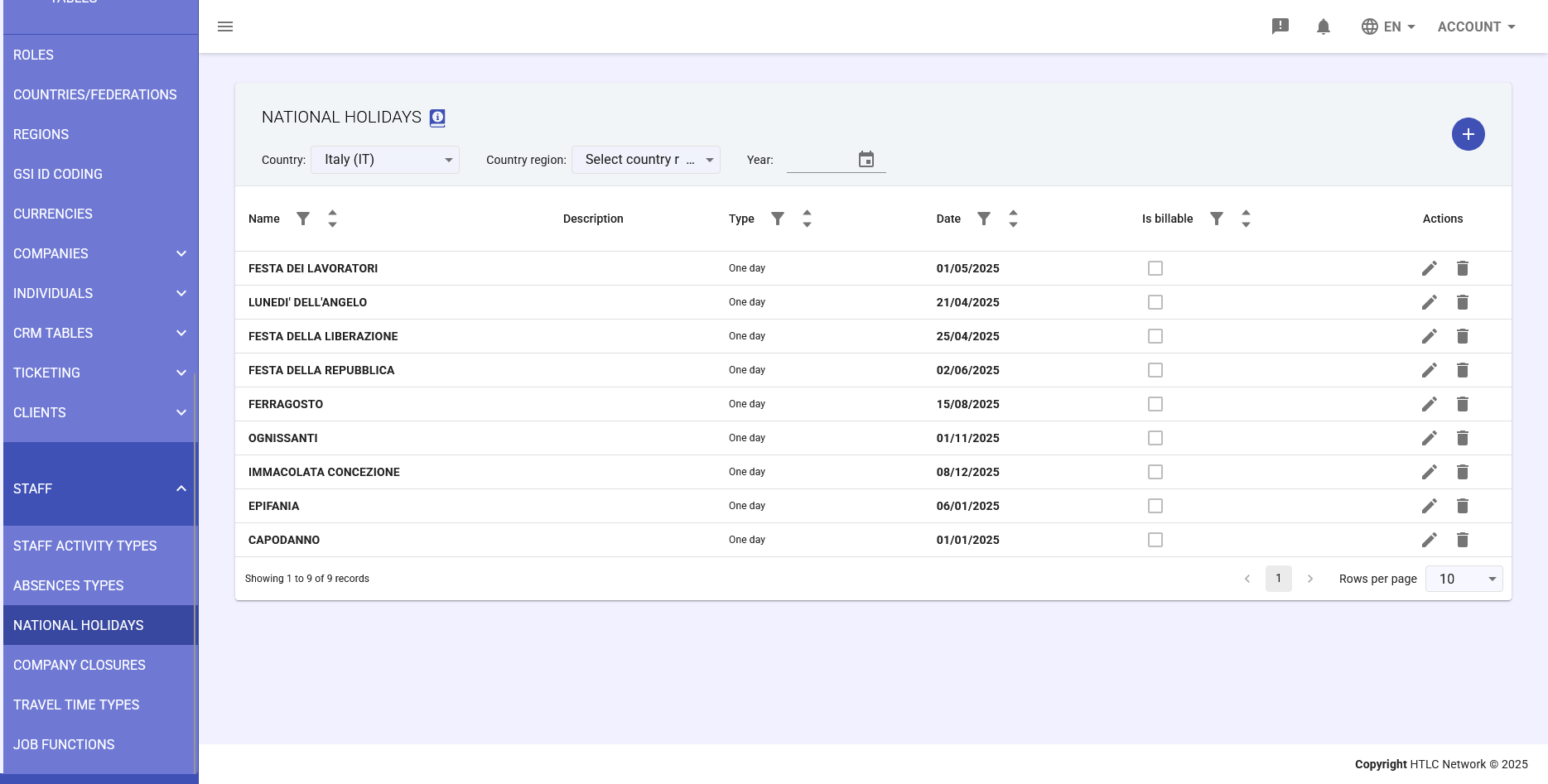
Main Table
The table displays all configured national holidays with the following columns:
Column Structure:
- Name: Official name of the holiday
- Description: Additional details about the holiday
- Type: Duration classification (One day / Multiple days)
- Date: Holiday date(s) (DD/MM/YYYY format)
- Is billable: Checkbox indicator for billing consideration
- Actions: Edit and delete operations
Filter Controls:
- Country: Filter holidays by specific country (e.g., Italy (IT))
- Region: Filter by regional area for localized holidays
- Year: Select specific year for holiday display
Holiday Configuration
Creating a New Holiday
Click the plus (+) button to open the "ADD NEW HOLIDAY" modal with these fields:
Required Fields:
- Name: Official holiday designation
- Country: Target country for the holiday application
- Code: Absence code to be applied automatically
Optional Fields:
- Description: Additional holiday information
- Region: Specific region for regional holidays (e.g., state holidays, provincial observances)
Type Configuration:
- One day: Single date holiday with a date picker field
- Multiple days: Extended holiday period with "Date from" and "Date to" fields
Additional Options:
- Is billable: Determines if the holiday time is considered billable for client projects
- Is considered working time for week based calculations: Includes holiday hours in weekly working time calculations
Matching Logic
How Holidays Apply to Employees:
- Country-Level Matching: The system checks if the employee's company is associated with the holiday's country
- Region-Level Matching: If a region is specified, the system checks if the employee's worksite falls within that region
- Automatic Absence Generation: On the holiday date, the system automatically creates an absence record with the specified code
- Anomaly Prevention: No clock-in anomalies are generated for employees on recognized holidays
Common Italian Holidays Example
Standard Italian national holidays typically configured in the system:
- FESTA DEI LAVORATORI (Workers' Day) - May 1st
- FESTA DELLA LIBERAZIONE (Liberation Day) - April 25th
- FESTA DELLA REPUBBLICA (Republic Day) - June 2nd
- FERRAGOSTO (Assumption Day) - August 15th
- OGNISSANTI (All Saints' Day) - November 1st
- IMMACOLATA CONCEZIONE (Immaculate Conception) - December 8th
- EPIFANIA (Epiphany) - January 6th
- CAPODANNO (New Year's Day) - January 1st
Best Practices
Holiday Planning Workflow:
- Annual Setup: Configure all known holidays at the beginning of the year
- Regional Consideration: Add region-specific holidays where applicable
- Code Assignment: Use consistent absence codes across similar holiday types
- Billing Review: Determine billability based on client contracts and agreements
Management Tips:
- Review and update holidays annually before the new year begins
- Verify regional holidays match actual worksite locations
- Coordinate absence codes with payroll department requirements
- Document any special holiday arrangements in the description field